PhotoTune 2: The Quick and Easy Solution for Color Correction

Color Correction without the Curve

Optimized tone and color in just a few clicks with PhotoTune.

  • NEW! Dynamic range enhancement using eye-fidelity technology remaps the tones in your image to look more natural, the way your eye sees it.
  • Get perfect tone and color for your photos in seconds.
  • Wizard walks you through the process of enhancing your image in as few as two steps.
  • SkinTune color corrects portrait images in one click, just like using a gray card but for skin.

Full version price: $159.95

Upgrade version price: $99.95

Buy Now

Upgrade

Free Download

Upgrade Eligibility | Multi-User Discounts

PhotoTune earned American Photo Magazine's Editors Choice Award for Imaging Essentials in 2008.

Great color, it’s not as hard as you think. If you can compare images side-by-side and pick the best one than you can easily color correct and enhance your images with PhotoTune 3. PhotoTune 3 optimizes the dynamic range using eye-fidelity technology. Additionally, PhotoTune 3 improves the color and sharpness of your image without the need to know how to use levels or curves in Photoshop. If you photograph people, you can also tune your images by clicking on skin tones to guarantee accurate skin color. Pro users get access to all the controls for tone, color and sharpening. Better images are just a few clicks away with PhotoTune 3.

Why Upgrade?

See the Top Reasons to Upgrade to Plug-In Suite 5.

About PhotoTune 3 and imsense

eye-fidelityThe new PhotoTune 3 uses patented eye-fidelity technology, originally developed by and licensed from imsense. imsense has developed and patented breakthrough algorithms to solve the problem of Dynamic Range Correction in standard and HDR images. eye-fidelity renders images faithful to the image the eye saw. It ensures that detail is revealed while maintaining color balance and integrity and the deliberate effects, such as region highlighting, employed by the photographer. eye-fidelity technology is unmatched for the speed, quality and versatility of its output.

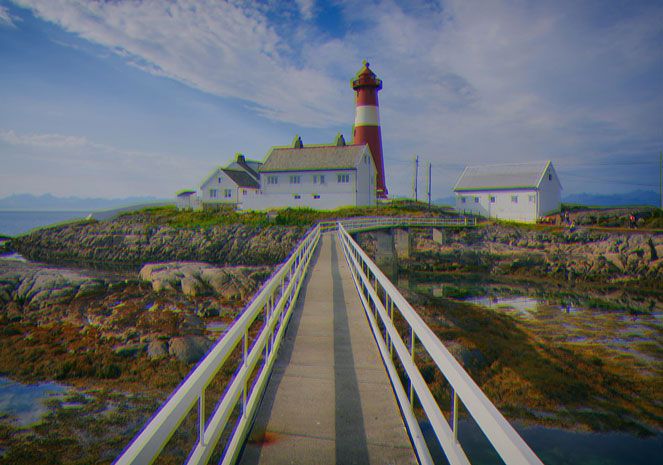
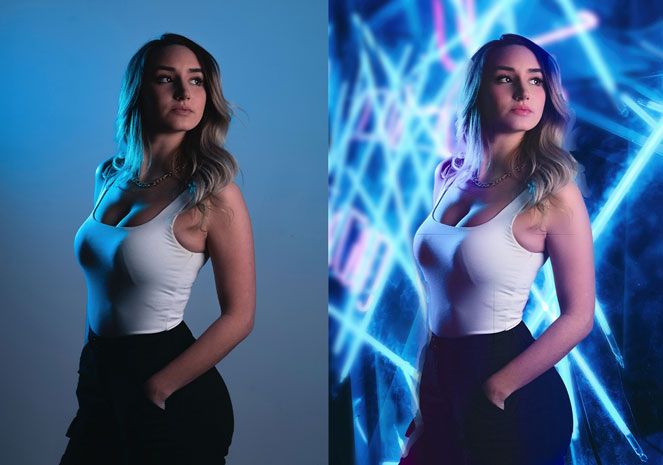
See the difference between the original and color corrected images.

“PhotoTune is one of the most important and useful plugins I use. Learning how to use Photoshop's native tools to achieve color correction, levels, etc. is a daunting task. Using PhotoTune allows even novices to achieve in mere seconds what an Photoshop expert would achieve after several minutes (if not longer) using Photoshop's editing tools. I have yet to see a single plugin that is as easy to use and so versatile.”

Mike Slonecker, Photographer

New!Automatic Correction

PhotoTune 3 now features a state-of-art automatic correction algorithm called eye-fidelity originally developed by imsense. In a single click, this amazing new eye-fidelity technology will correct the brightness, contrast, color and dynamic range of any photo. This goes way beyond a simple auto-levels or shadow-highlight adjustment. It actually remaps tones to increase the dynamic range and make it appear more true-to-life, the way your eye saw the scene when you first captured the digital photo.

Improved Wizard

At the heart of PhotoTune is the patented step-by-step wizard that simplifies the correction of your image without the need to understand complicated color and tone controls. This has been enhanced to combine the new auto-correction algorithm, SkinTune color correction and sharpening. This makes the wizard the fastest and easiest way to optimize your images no matter what your experience level.

New!Pro Controls

PhotoTune 3 also adds a new professional interface for users who desire complete control. You have access to the tone, color, SkinTune and detail controls. PhotoTune takes away the complex concepts like levels and curves and and provides simply ways to make advanced adjustments like sharpening, portrait color correction and gray purity. With the simply, innovative controls you just slide your image in the preview space to make adjustments that look good to your eye. No need to understand complex histograms and curves.

Intuitive Black and White Conversions

You can create great looking black and white images from your color photos with PhotoTune as well. Simply flip the black and white switch and you are working just like Ansel Adams. Use the color controls to change the tone, just like using filters over your camera lens.

Skin Color Control

The SkinTune controls, which automatically color-correct portraits in a single click, have been improved to give the option to only correct the subjects skin, rather than the entire image. This makes it more useful when working with models where the rest of the scene is color correct, but the subject’s skin may need a correction.

Smart Filter

PhotoTune 3 can now be used as a Smart Filter in Photoshop CS3 and CS4 allowing you to make non-destructive, re-editable adjustments on Smart Objects like Raw files. When used in conjunction with the new Lightroom integration this creates a seamless, non-destructive workflow experience for your raw images.

New!Lightroom/Aperture Integration

Like other onOne products, PhotoTune 3 now supports integration with Adobe Photoshop Lightroom and Apple Aperture. This allows users to access PhotoTune 3 and its presets directly inside the workflow applications they use everyday. (note, Lightroom integration requires a full version of Photoshop as well.)

New!Recently Used Presets

PhotoTune 3 now allows users to save presets, which store all of the color and tone corrections, so they can be applied to other similar images. This can be accomplished inside of Photoshop directly, or inside of Adobe Photoshop Lightroom or Apple Aperture.

New!onOne Panel

The new onOne Panel in Adobe Photoshop allows you to quickly launch PhotoTools without having to navigate through Photoshop's menus. But it takes that power even farther by giving you access to your favorite presets right from the panel as well. This will save time by allowing you to apply your most frequently used effects right inside of Photoshop.

PhotoTune Video Tutorials

What's new in PhotoTune 3

Running time: 4:51

Using the Wizard

Running time: 10:05

Adjusting Color

Running time: 6:53

Using SkinTune

Running time: 4:06

View more PhotoTune videos

The PhotoTune training videos above are just the tip of the iceberg. We have over 100 product training videos covering the entire line of Photoshop plug-ins from onOne Software available for you to watch online for free.

PhotoTune User Guides

Download PDF

PhotoTune 3 in action

Seeing is believing. Here are several examples of PhotoTune 3 in action. See for yourself the difference that PhotoTune 3 makes in making digital photography easier, faster and better.

System Requirements

Apple Mac OS X Microsoft Windows
Latest Version
  • 3.0
  • 3.0
Operating System
  • Mac OS X 10.5 or 10.6
  • Windows XP, Windows Vista SP2 or Windows 7
Computer Processor
  • PowerPC G5 or Intel processor
  • Pentium 4 or equivalent
Computer Memory
  • 2GB RAM
  • 100MB of hard drive space
  • 2GB RAM
  • 100MB of hard drive space
Display
  • OpenGL 2.0 capable video card with 128MB VRAM running at 1024x768 (1280x1024 or higher recommended)
  • OpenGL 2.0 capable video card with 128MB VRAM running at 1024x768 (1280x1024 or higher recommended)
Required Host Application
  • Adobe Photoshop CS2, CS3, or CS4
  • Adobe Photoshop Elements 6 or 8
  • Adobe Photoshop CS2, CS3, or CS4
  • Adobe Photoshop Elements 6, 7 or 8
Optional Host Applications and Integration
  • Adobe Photoshop Lightroom 2
    Integration with Adobe Photoshop Lightroom requires Adobe Photoshop CS2, CS3, or CS4
  • Apple Aperture 2.1
    Some of Aperture's output options require Adobe Photoshop CS2, CS3, or CS4
  • Adobe Photoshop Lightroom 2
    Integration with Adobe Photoshop Lightroom requires a full version of Adobe Photoshop CS2, CS3, or CS4
Other
  • Internet connection for auto-updates, activation, and video tutorials
  • Adobe Flash Player 10
  • DVD Drive if installing from disk
  • Administrator privileges to install and uninstall
  • Internet connection for auto-updates, activation, and video tutorials
  • Adobe Flash Player 10
  • DVD Drive if installing from disk
  • Administrator privileges to install and uninstall
Language

PhotoTune earned American Photo Magazine's Editors Choice Award for Imaging Essentials in 2008.

Awards and Accolades

“PhotoTune 2.2 earns Best of Show award at the MacLive Expo London 2007.”

Read full review »

Macworld UK Magazine

“PhotoTune earns American Photo Magazine's Editors Choice Award for Imaging Essentials in 2008.”

Read full review »

American Photo Magazine